Automation of executions
In summary
-
Automatic execution allows the task pipeline to be executed without the need for a user to be logged in.
-
Only the Owner and Contributors can define the frequency of execution
-
The frequency is defined using a CRON syntax.
-
It is possible to use a CRON generation form
-
To pause an automatic execution, disable Scheduling
-
It is still possible to use manual execution even if an automatic execution is defined
-
You can make a request to stop by clicking on the icon btn:[STOP]
 .
.
Set frequency
Frequency is available and visible for automatic Schedules, when creating or editing a Schedule.
It can be defined directly in CRON language or generated from a form.
By default, the frequency is set to run every day at 6am.
CRON form
DC-Maestro allows you to use the standard CRON syntax to define a Schedule frequency of execution.
| Field | Accepted numbers | Accepted characters | Details |
|---|---|---|---|
Month (M) |
1 to 12 |
, * / - |
|
Days (D) |
1 to 31 |
, * / - L # |
|
Week (W) |
0 to 6 |
, * / - |
|
Hours (H) |
0 to 23 |
, * / - |
|
Minutes (m) |
0 to 59 |
, * / - |
The character * alone and a frequency lower than */5 are not accepted |
| Character | Description |
|---|---|
, |
Fixed value |
- |
Range of values (ascending order) |
* |
All values |
/ |
Interval within a specific range |
# |
Nth day of the month (1#2: 2nd Monday of the month) |
L |
Last day of the month (1L: Last Monday of the month) |
To learn more about the CRON language, see Wikipedia page.
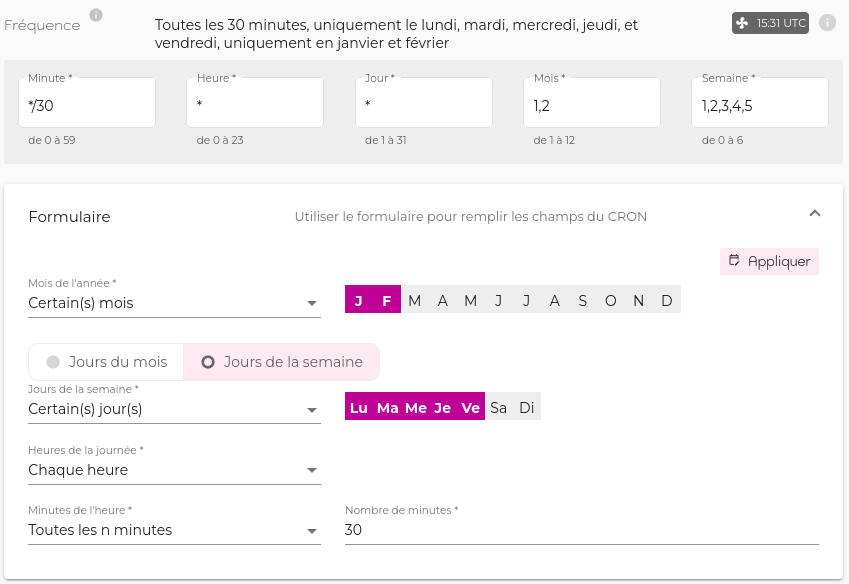
CRON generation form
The form transforms the frequency set in natural language to CRON syntax.
All the options (minutes, hours, days, months) must be specified.
Then click on  to display the result in the CRON form.
Execution Time Zone Selection
By default, CRON runs in the UTC time zone, the basis of international civil time.
However, it is possible to change this execution time zone by selecting one of the local time zones available in the selection drop-down list for better readability and easier CRON configuration.
Enable and disable recurrence
You can disable Scheduling to block executions (automatic and manual), for example while you resolve a failed task or modify the task pipeline.
You can activate and deactivate a schedule
-
from the Schedules + list Click on the menu at the end of the line, then click on btn:[Deactivate].
-
from the ‘Settings’ tab on the Schedule page + click on the image:schedule icon. Click on the
 icon to edit the metadata area + Move the switch to .
Move the switch to
icon to edit the metadata area + Move the switch to .
Move the switch to  to deactivate it and
  to activate it.
| It is impossible to run an Schedule when it is idle. |
Dernière mise à jour le 10 juin 2026 à 18:16