Project Home
General
Each DataChain project has a dedicated home page which adapts according to the selected working module, GenericsData  or HandleData

The home page provides a quick overview of the latest actions performed on the various DataChain elements by all project members.
There are 2 different types of actions :
-
common actions (Creation, Modification, Deletion)
-
actions specific to element types (DataBlock Persistence, Entity Extraction, Dashboard Publication, etc…)
Project Version being viewed
The home page displays the elements of the Project’s working version. The number of this version is shown in the top menu, next to the Project name.
To view another version, click the version number in the top menu and select the desired version from those available.
| Changing the working version does not change the active version of the Project. To understand this distinction and manage versions, see Project Versioning. |
Access - Home
- The home page can be accessed either
-
-
from the project list, by clicking a project card
-
from the left-hand menu, by clicking the
icon if a project is already selected
-
Features - Home
The home page provides general information about the selected project, the total number of elements of each type it contains, and allows users to view and filter the list of latest actions by element type.
The visible element types (DataBlocks, Entities…) and available actions (creation, modification) vary from one user to another, depending on the permissions and specific rights assigned to their profile.
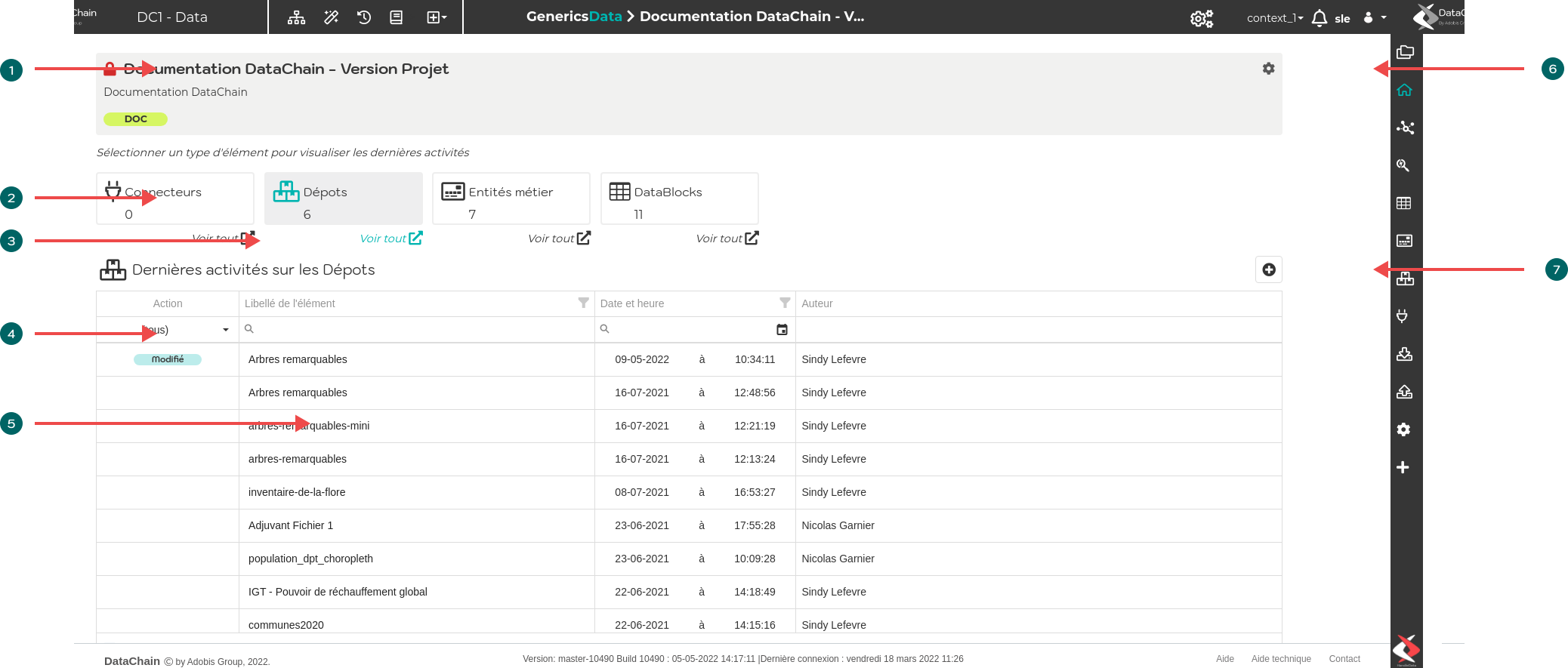
 Information area for the selected project
 Only project administrators can see the icon and access the project modification page

 Cards for the module’s element types (GenericsData here). Shows the total number of elements for each type.
Selecting a card updates the latest actions table for the selected element type (Repositories here).
 Clicking it opens the list of elements.
 Table of the latest actions performed for the selected element type. The first column can be used to filter by action type.
 Label of the relevant element. Clicking it opens the element modification page if the user has sufficient rights.
 Shortcut for creating a new element based on the selected type (here, this action opens the page for creating a new Repository).
The creation action is available only to users who have the global permission to create this type of element.
Dernière mise à jour le 28 octobre 2026 à 18:35